For years, the classic business email compromise scam followed a familiar script. A message that appeared to come from the CEO landed in the inbox of someone in finance, demanding an urgent wire transfer for a confidential deal. Organizations trained employees to look twice at unexpected requests from the corner office.
Criminals noticed. Today, business email compromise often arrives from a vendor your team has paid for years. Sometimes it skips email entirely: a Microsoft Teams call, a Slack message, a text, a familiar voice on the phone. The FBI’s 2025 Internet Crime Report recorded 24,768 business email compromise complaints and roughly $3.05 billion in losses in a single year. That report describes the scheme as fraudsters “compromising email accounts and other forms of communication such as phone numbers and virtual meeting applications.” The impersonation and payment-diversion tactics behind business email compromise are no longer confined to the inbox.
What Is Business Email Compromise?
Business email compromise (BEC) is a fraud scheme in which criminals impersonate a trusted business contact or take over a legitimate business email account to induce an unauthorized transfer of funds. Related social engineering schemes increasingly use the same tactics through collaboration platforms, text messages, phone calls and video. Common variations include invoice fraud, wire fraud and payment diversion fraud, where a legitimate payment is rerouted to an account the criminal controls. Because these schemes rely on persuasion rather than malicious code, they often slip past technical defenses.
Here are seven ways the scheme has evolved and what organizations can do about it.
How Business Email Compromise Has Shifted to Trusted Vendors
1. Invoices Now Come From Real Vendor Accounts
Fraudsters no longer need to fake a sender. They break into a supplier’s mailbox, often through phishing, study the billing cycle, then send a routine-looking invoice from the real account with one detail changed: the bank account. This tactic is known as vendor email compromise. In an analysis of nearly 800,000 email attacks, 2026 research from Abnormal AI found that vendor email compromise accounted for roughly 61% of the business email compromise activity it observed.
2. Banking-Change Requests Have Become the Danger Zone
Abnormal AI’s data shows why. Among the vendor-related attacks it studied, billing account update requests had a 26.5% account compromise rate, compared with less than 1% for routine invoice inquiries. In other words, criminals were far more likely to compromise a vendor’s actual mailbox for a billing-change request than for a routine invoice inquiry. When the prize is redirected payments, they take the trouble. That makes a request to change where money goes the moment an accounts payable team should slow down, every time. This risk also overlaps with the internal schemes described in our article on billing scheme fraud, where insiders create or alter vendor records for personal gain.
Business Email Compromise Beyond the Inbox
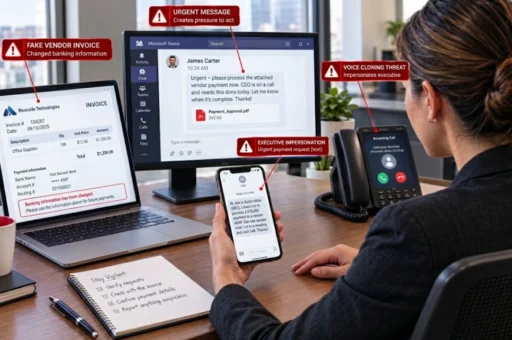
3. Microsoft Teams Messages and Calls From “IT”
Collaboration platforms feel internal, and attackers exploit that sense of safety. Microsoft Threat Intelligence has documented criminals using Teams chats and voice or video calls to pose as help desk staff, in some cases after flooding a target’s inbox with junk email so the “support” call seems helpful. A September 2026 Microsoft report describes attackers contacting employees from outside the organization while posing as internal IT personnel. Once an employee grants remote access, the attacker is inside and working outward toward the accounts and systems that matter.
4. Slack and Other Chat Apps
Slack, WhatsApp and similar tools are now common routes for impersonation. Security awareness firm KnowBe4, citing research from NCC Group’s Fox-IT, notes that these channels work because of how people use them. Messages get read fast, usually on a phone, where sender details are hard to inspect. And protection depends on each platform’s settings rather than the mature filtering built up around email. A quick approval request from a “colleague” can be enough to start a fraudulent payment.
5. Text Messages to Executives and Their Teams
Text messages bypass corporate email security entirely. In a May 2025 public service announcement, the FBI warned that criminals were sending text messages and AI-generated voice messages impersonating senior U.S. officials, often urging recipients to move the conversation to another messaging platform. The same playbook works against business leaders. A text that reads, “I’m stuck in a meeting. Can you handle this payment for me?” is simply a modern version of the CEO email.
6. Cloned Voices on the Phone
Employees are often told to confirm payment requests by phone. That advice still matters, but voice cloning has raised the bar. The FBI cautions in the same announcement that AI-generated voices can sound nearly identical to the real person. A callback only works when the employee dials a number already on file, never a number supplied in the suspicious message.
7. Deepfake Video Meetings
The most dramatic example came to light in 2024, when a finance employee in the Hong Kong office of engineering firm Arup joined a video call with what appeared to be the company’s chief financial officer and other colleagues. The participants were deepfakes. The employee made transfers totaling HK$200 million, roughly US$25 million, as CNN reported. Deepfake calls are still rare next to vendor account takeovers, but the tools keep getting easier to obtain and harder to spot. A familiar face on screen is no longer proof of identity. For more on how criminals use artificial intelligence, see our article on AI-assisted fraud.
Why Phishing Training Alone No Longer Stops Business Email Compromise
Security awareness programs teach employees to inspect sender addresses, hover over links and watch for spelling errors. Those habits still help, but they were built for spoofed email. A message from a vendor’s real account has a sender address that checks out. A request that arrives by Teams, text or phone has no email header to inspect at all. And when artificial intelligence writes the message or clones the voice, the typos employees were taught to catch are gone. Effective training now focuses on risky requests, such as a change in banking details, unusual urgency or pressure to skip verification, no matter how trustworthy the channel appears.
Why Employees Are the First Line of Defense Against Business Email Compromise
Every scheme above depends on persuading a person to act. Accounts payable clerks, executive assistants, procurement staff and help desk workers see these requests first, and they notice what software misses: a vendor who suddenly wants payment sent to a new bank, a manager who has never used Teams to request a wire, or pressure to skip verification “just this once.”
The challenge is making it easy for employees to stop a transaction, question a request from someone senior and say something when a request does not feel right. They may worry that questioning an executive’s request will look insubordinate, or they may feel embarrassed after nearly falling for a scam. Others notice a colleague routinely bypassing payment controls and assume someone else will speak up. An anonymous reporting channel gives them a safe way to raise the odd payment request, the skipped approval or the near miss before money leaves the building.
Seven Controls That Reduce Business Email Compromise and Payment Fraud Risk
The FBI’s Internet Crime Complaint Center recommends verifying account changes through a secondary channel and checking sender details closely. Building on that guidance, the controls that hold up are the ones that survive a busy Friday afternoon:
- Verify a banking change by calling a number you already have on file, never the number in the request.
- Put two sets of eyes on every new payee and every change to vendor banking details.
- Hold requests that arrive by Teams, Slack, text, phone or video to the same verification rules as email.
- Limit or monitor who outside your organization can reach employees on collaboration platforms.
- Decide in advance how an urgent executive request gets confirmed, so nobody has to invent a process under pressure.
- Train with examples that look like this year’s fraud rather than the CEO email of a few years ago.
- Tell employees where to report a request that felt wrong, including the ones that turn out to be fine.
How a Hotline Strengthens Your Business Email Compromise Defenses
Some concerns do not fit behind a “report phishing” button. An employee may suspect that a coworker is overriding vendor verification, that a manager is pressuring staff to rush payments, or that a near miss is being quietly ignored. These are ethics and internal control concerns that call for a reporting channel employees trust.
Red Flag Reporting’s ethics and fraud hotline gives employees 24/7/365 access to live operators and a secure web portal, with the option to remain anonymous. Reports go to your organization’s designated contacts, and our case management platform helps your team track follow-up. Red Flag Reporting does not investigate reports, so your organization retains full control of every case. Learn more about the benefits of an anonymous hotline provider and how a hotline can protect your bottom line.
Take the Next Step
Business email compromise will keep changing shape. What carries over from one version to the next is an alert employee with somewhere to take a concern. To give your team that channel, contact Red Flag Reporting to request a quote or demo, or call our sales office at 1-877-676-6551.
Frequently Asked Questions About Business Email Compromise
What is the difference between phishing and business email compromise?
Phishing is a broad tactic used to steal passwords or install malware, often through mass messages. Business email compromise is a targeted fraud scheme designed to move money, and criminals often use phishing as the first step to take over the account they need.
Can business email compromise happen through Microsoft Teams or Slack?
Yes. Criminals increasingly extend the same impersonation and payment fraud tactics associated with business email compromise to Microsoft Teams, Slack, text messages, phone calls and even deepfake video meetings. The channel changes, but the goal is the same: convince an employee to trust the request and act on it.
What is vendor email compromise?
Vendor email compromise is a form of business email compromise in which criminals take over a real supplier’s email account and send invoices or payment instructions with altered banking details. Because the messages come from a genuine address, they are much harder to detect.
What should an employee do after receiving a suspicious payment request?
Pause, do not reply through the same channel, and verify the request using contact information already on file. Report it to your IT security team, and if the situation involves pressure to bypass controls or possible insider involvement, report it through your organization’s ethics hotline as well.
How does an ethics hotline help prevent business email compromise?
A hotline gives employees a confidential, and when desired anonymous, way to report suspicious requests, near misses and colleagues who skip payment controls, helping organizations fix weaknesses before a loss occurs.
Reach Us
Red Flag Reporting
P.O. Box 4230, Akron, Ohio 44321
Tel: 877-676-6551
Fax: 330-572-8146